
Compare Two Benchmark or Eval Runs
You changed a prompt, a model, a cache, or a query, and ran the benchmark again. Slicelytics puts the two runs side by side, highlights every item whose values changed, and lists only the changes. Both runs stay on your computer.
See What Changed Between Runs
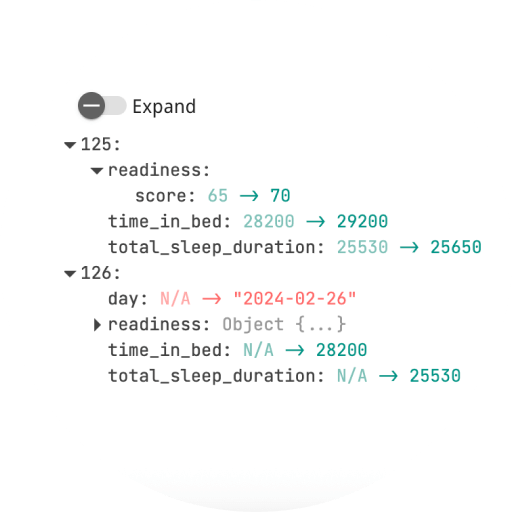
Open the two runs in Compare, as JSON, NDJSON/JSONL, CSV, or TOON files. Slicelytics shows them side by side with the changed items highlighted, plus a diff pane that lists only the changes, by item position: e.g. item 2, score: 999. Filter the diff by property to see the scores that changed, not the timestamps and durations that always do.
Both sides can be large NDJSON files of several gigabytes. They load in the background, 100 items at a time, and "Load more" in either pane loads the next batch of both, so their rows stay side by side.
Let Your Agent Open Both Runs
If an AI coding agent such as Claude Code runs your benchmarks, ask it to "compare run-41 and run-42 in Slicelytics". With the Slicelytics skill, the agent builds a link that carries both runs and opens Compare with them:
python3 scripts/slicelytics_link.py run-41.ndjson --compare run-42.ndjson --openFor larger runs, or a loop that writes a new run every few minutes, the agent writes each run into a folder that Slicelytics watches, and names the run to compare against in a small view file next to the newest run:
// run-42.view.json
{ "v": 1, "compare": "run-41.ndjson" }
New runs join the folder's list, newest first, without replacing what you are looking at. When you want to see one, ask your agent ("show me run 42"), or click it. The AI agents guide covers both routes.
Keep Items in the Same Order
Compare matches items by their position in the file, not by a key. If your runner writes results in the order they finish, e.g. from parallel workers, two runs list the same test cases in different orders, and every item after the first mismatch shows as changed.
The fix is to write results in a fixed order, such as sorted by test ID. If the runs are already written, your agent can sort copies of both by a key you choose. The Slicelytics skill tells agents to point the problem out and ask first, and never to change the original files.
Common Questions
Which files can I compare?
JSON, NDJSON/JSONL, CSV, and TOON, plain or compressed as .gz or .zst. The two files don't need to be in the same format.
Can I share the comparison?
Yes. Share copies one link that carries both datasets in the part after #, which browsers never send to a server.
Can I chart a metric across runs instead?
Write one row per run, e.g. run, accuracy, and p95_ms, and open it in Visualize with run as the x-axis.