
Review Data Diffs Too Large for GitHub
A pull request updates a test snapshot, a mock API response, or a fixture, and GitHub says "Diff is too big to render". Open the two versions in Slicelytics Compare instead: every changed value, side by side, however large the file.
Where GitHub Stops
GitHub loads the first 400 lines or 20 KB of a file's diff on its own. Past that, you click "Load diff", and a file whose diff exceeds 20,000 lines or 500 KB isn't shown in full at all. Snapshot files, recorded API responses, and generated fixtures cross those limits easily, and even when they don't, a line diff of pretty-printed JSON shows brackets and commas that moved, not which values changed.
A Structural Diff Instead of a Line Diff
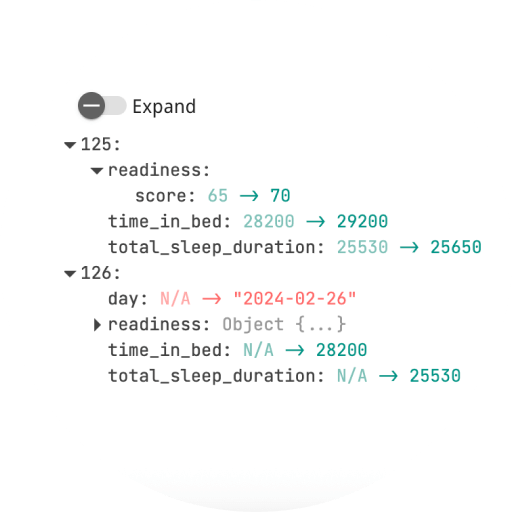
Slicelytics Compare reads both versions as data. Objects are compared key by key, so keys that only moved don't show as changes, and the diff pane lists just the values that differ. Filter it by property to skip the ones that always change, such as timestamps and generated IDs, and expand only the parts you are reviewing.
- Formats: JSON, NDJSON/JSONL, CSV, and TOON, plain or compressed as
.gzor.zst. - Arrays are matched by position. If a snapshot lists items in a different order than before, every item after the first difference shows as changed.
- Nothing is uploaded. The files are read in your browser, so it works for private repositories and real-looking test data alike.
Ask Your Agent to Open the Diff
With the Slicelytics skill installed, an AI coding agent such as Claude Code does the whole thing from one request. In Claude Code, install it as a plugin:
/plugin marketplace add duryno/Slicelytics-public
/plugin install slicelytics@slicelytics
Then, in the repository, ask for the file you want to review:
Compare the changes to test/fixtures/users.json in this PR in Slicelytics.The agent takes the file as it was where the pull request branched off, which is the version GitHub diffs against, and as it is on the branch, and opens both in Compare, the older version on the left. Neither file is edited. Under the hood, that's:
git show $(git merge-base origin/main HEAD):test/fixtures/users.json > /tmp/users.base.json
git show HEAD:test/fixtures/users.json > /tmp/users.pr.json
python3 scripts/slicelytics_link.py /tmp/users.base.json --compare /tmp/users.pr.json \
  --name "users.json (main)" --compare-name "users.json (this PR)" --open
The script packs both versions into one link, so this works up to a few megabytes of JSON, depending on how well it compresses. For larger files, the agent writes both versions into a folder that Slicelytics watches instead, as described in the AI agents guide.
Without an Agent
- Save both versions: run the two
git showcommands above, or download the file from both branches on GitHub with "Raw". - Open Compare: drop the older version onto the left pane and the newer one onto the right.
- Review the diff: filter by property, expand what you need, and click Share to send a reviewer a link that carries both versions.
Common Questions
Does it open Jest .snap files?
No. Jest snapshots are JavaScript, not JSON. Snapshots and mocks stored as .json, .ndjson, .csv, or .toon files work.
Can I compare a whole directory of snapshots?
Compare shows one pair of files at a time. Ask your agent which snapshot files changed in the pull request, then open the ones you want to review.
Does the diff stay private?
Yes. Files are read in your browser, and a shared link carries the data after the #, which browsers never send to a server.