
Compare Wearable API Responses
You build on Oura, Whoop, Garmin, Google Health, or an aggregator like Terra. A sleep you stored an hour ago comes back different, a webhook re-sends a record with new values, or a provider changes a field your code reads. Slicelytics puts two responses side by side and lists every field that changed. The payloads stay on your computer.
See Which Fields Changed
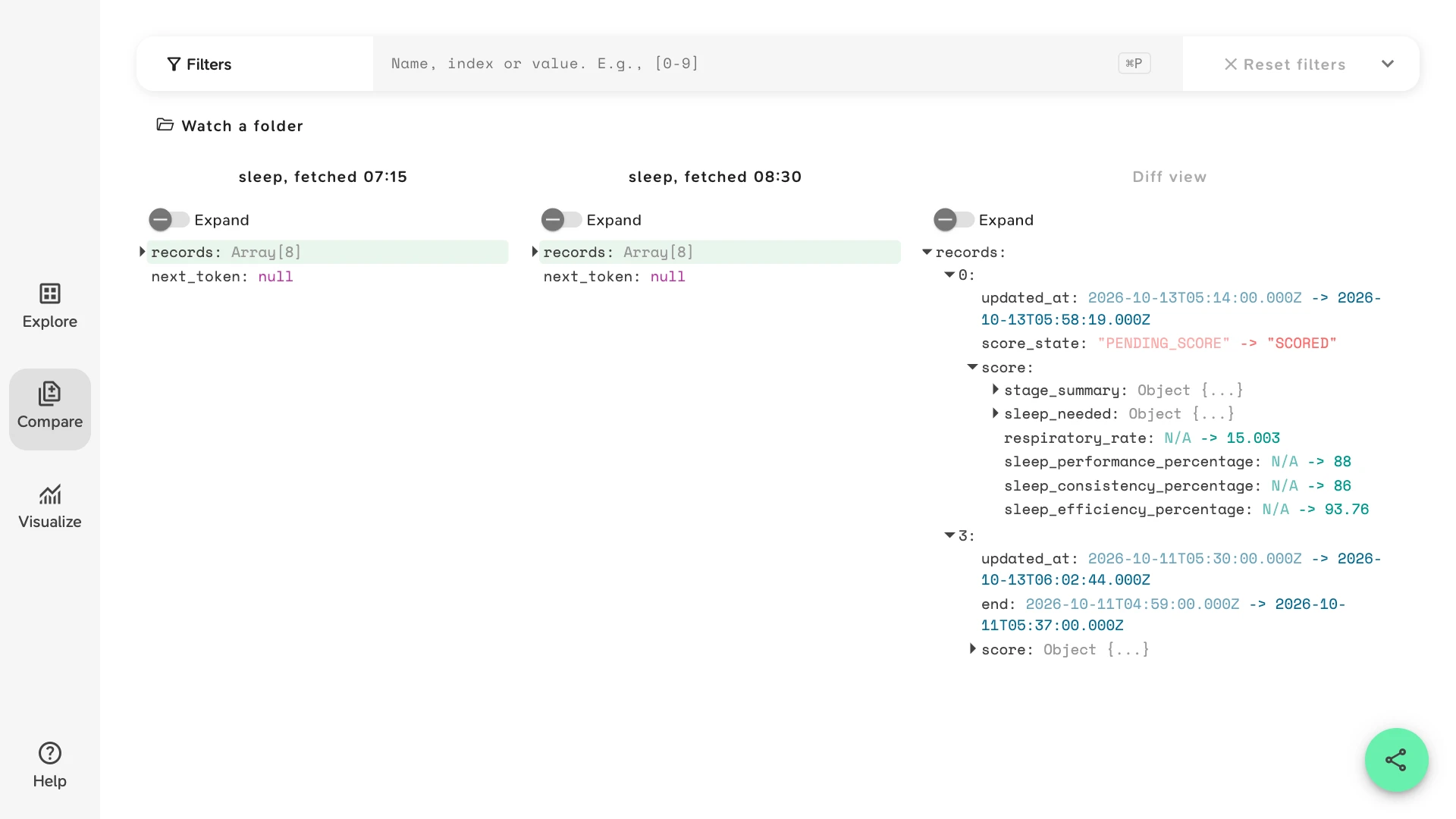
Save the two responses as files and open them in Compare. Slicelytics shows them side by side, highlights the records whose values changed, and the Diff view lists only the changes, down to nested fields. Turn on Expand in the Diff view to see them all at once.
The sample is a week of sleeps from Whoop's v2 API, plus one nap, fetched at 07:15 and again at 08:30 the same morning. Two records changed in between:
- Record
0, last night:score_statewent fromPENDING_SCOREtoSCORED, and its wholescoreobject appeared. - Record
3: the member corrected their wake time, soendmoved by 38 minutes, and the stage totals andsleep_performance_percentagewere scored again.
The sample opens without an account. Both files are synthetic, written to Whoop's published schema.
Save Two Responses
Request the same endpoint twice, with the same parameters, and save each response as it comes:
curl -s -H "Authorization: Bearer $TOKEN" \
  "https://api.prod.whoop.com/developer/v2/activity/sleep?start=2026-10-06T00:00:00Z&end=2026-10-13T12:00:00Z" \
  > sleep-0715.json

# an hour later, or after your sync job ran
curl -s ... > sleep-0830.json
The same works for any provider: Oura's daily_sleep, a Garmin or Google Health response, or the normalised payload your aggregator sends. You can also compare what your database stored with what the API returns today, or a response from your staging pipeline with one from production.
Fetch the Same Range Both Times
Compare matches records by their position in the response, not by their id. Wearable APIs sort by time, often newest first, so if the second request covers a later range, a new record at the top shifts every other one, and they all show as changed.
Pass the same start and end, or the same dates, to both requests. For paginated endpoints, compare page by page, or merge each fetch's pages into one file first.
Guides for Each API
Each provider changes its data in its own way, and these guides go into one each, with a sample of its payloads: Compare Oura API Responses follows a sleep document through a bedtime edit, Compare WHOOP API Responses the recoveries of this page's sample morning, Compare Garmin Health API Data a daily summary pushed twice in one day, and Compare Terra Webhooks a night delivered twice by an aggregator.
Explore One Response in Depth
Open a single response in Explore to walk its nested objects and sample arrays, and to filter by value. For example, typing records.score_state!="SCORED" into the filter keeps only the sleeps that are still pending or couldn't be scored: in the 07:15 sample, last night and the night of 7 October. records.nap="true" keeps only the naps.
If you log webhook bodies, append each one as a line of an .ndjson file. Slicelytics opens logs of several gigabytes and filters them by event type or user; see View JSONL Logs.
Open the Device's FIT File
Garmin, Polar, Suunto and other devices record activities as FIT files, and some APIs, such as Garmin's Activity API, hand you the file itself. Open a .fit file, plain or gzipped, and Slicelytics decodes it in your browser into one list per message type: record for the samples taken during the activity, lap, session, event, device_info and so on. Fields are named and scaled as the FIT profile defines them, positions are in degrees, and times are ISO dates.
In Visualize, pick record.heart_rate and choose record.timestamp as the x-axis to chart heart rate over the activity. In Compare, open two FIT files of the same activity, e.g. the one your webhook received and the one you downloaded later, to see which fields changed. See View FIT Files for more.
Let Your Agent Open Both Responses
If an AI coding agent such as Claude Code fetches the responses for you, ask it to "compare sleep-0715.json and sleep-0830.json in Slicelytics". With the Slicelytics skill, the agent builds a link that carries both files and opens Compare with them:
python3 scripts/slicelytics_link.py sleep-0715.json --compare sleep-0830.json --openThe skill tells the agent to pass the files as they are and to read only what it needs to set up the view, such as the field names. Check your provider's API terms before an AI model reads any user's data, or use a test account.
Common Questions
Does the data leave my computer?
No. Slicelytics reads the files in your browser and uploads nothing. If you share a comparison, the data travels in the part of the link after #, which browsers never send to a server, so treat the link like the data: anyone who has it can open it.
Which providers and formats work?
Any API that returns JSON, e.g. Oura, Whoop, Garmin, Polar, Withings, Dexcom, Google Health, or an aggregator such as Terra, Junction, Spike or ROOK. Files can be JSON, NDJSON/JSONL, CSV, TSV, TOON, or a device's FIT file, plain or compressed as .gz or .zst.
Can I compare two providers' responses?
You can open them, but Compare matches records by position and fields by name, so two different schemas show as mostly different. It works best on two responses from the same endpoint: before and after a re-score, a sync, a backfill, or a change in your own pipeline.
How large can the responses be?
A JSON file is read into memory whole, which suits API responses. For bulk exports or long webhook logs, use NDJSON: it loads in the background, 100 records at a time.