Read Developer Fields in FIT Files
Your users run with a Stryd pod, a core temperature sensor or a Connect IQ data field, and the FIT files your integration receives carry those values as developer fields: defined inside the file, not in the FIT profile, so many parsers skip them. Slicelytics decodes them in your browser by the names the file gives them, next to the messages that define them, so you can see what a file holds before you write the code to read it.
How a FIT File Defines Its Own Fields
The FIT profile defines the standard messages and fields, such as record and its heart_rate. A developer field is defined in the file itself, by two messages written before the first value:
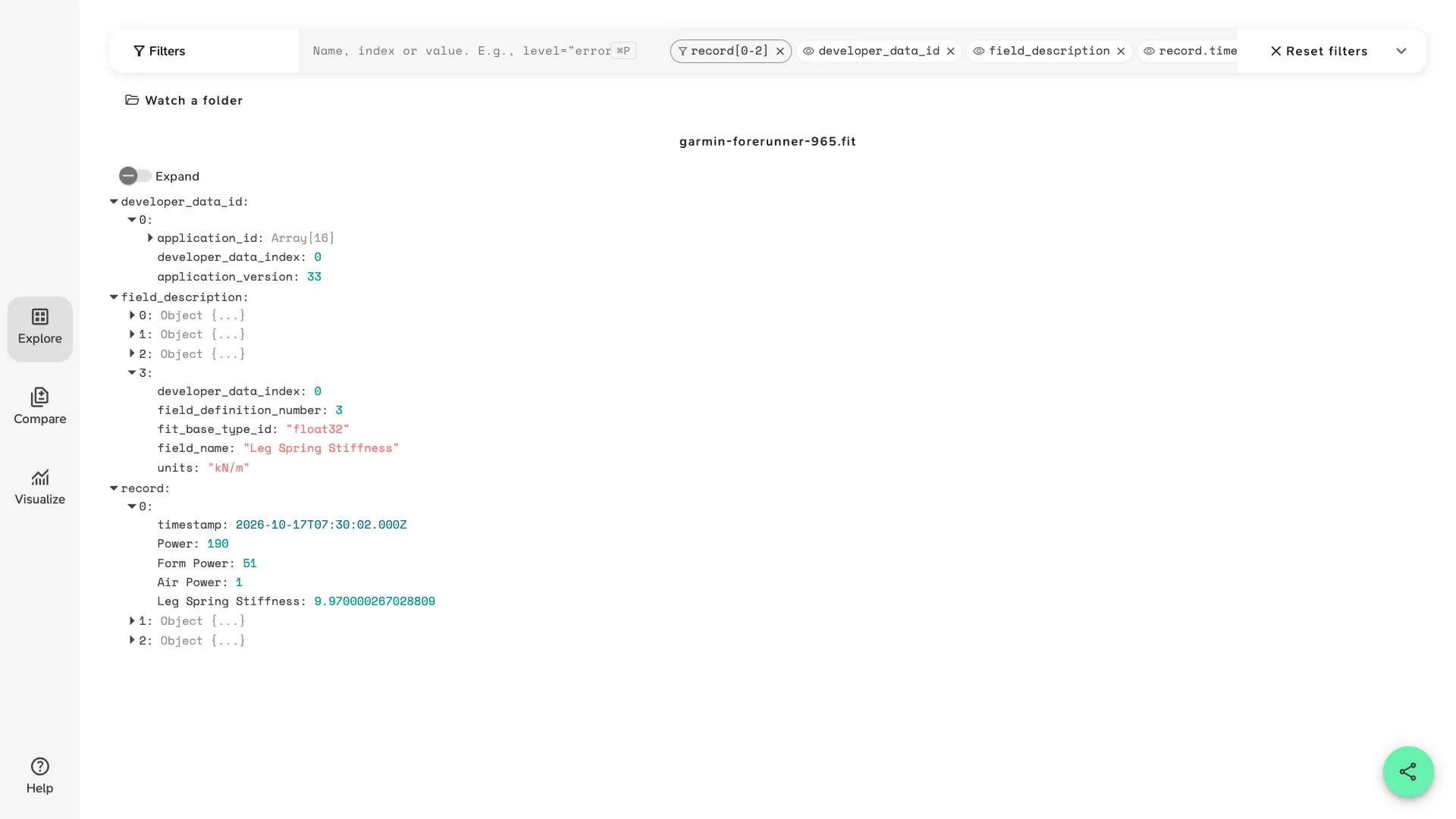
developer_data_idnames the app that writes the fields: itsapplication_id, the 16 bytes of its Connect IQ app ID, itsapplication_version, and adeveloper_data_index, a number the rest of the file uses for it.field_description, one per field, says what the field is: its app'sdeveloper_data_index, its ownfield_definition_number, its type infit_base_type_id, itsfield_nameand itsunits. It can also carry ascaleandoffset, and anative_field_numwhen the field stands in for a standard one.- The values follow in the messages the app writes to: the index and field number pick the description, which says how to read the bytes.
Slicelytics reads all three and shows each value under its field_name, next to the standard fields. The sample is a 5 km run recorded by a Garmin Forerunner 965 with a Stryd foot pod, whose app writes four fields:
| Name | Number | Type | Units |
|---|---|---|---|
| Power | 0 | uint16 | Watts |
| Form Power | 1 | uint16 | Watts |
| Air Power | 2 | uint16 | Watts |
| Leg Spring Stiffness | 3 | float32 | kN/m |
Open the sample without an account, and turn on Expand. It opens in Explore with this view: both defining messages, and the first three records with only their time and developer fields. Remove the record[0-2] chip under Filters to see all 576.
{
  "v": 1,
  "view": "explore",
  "props": [
    "developer_data_id",
    "field_description",
    "record[0-2]",
    "record.timestamp",
    "record.Power",
    "record.Form Power",
    "record.Air Power",
    "record.Leg Spring Stiffness"
  ]
}
The sample is synthetic, written to the FIT profile. The link carries the file as it is, compressed.
Reading the Values
The first record of the sample, with only its developer fields:
{
  "timestamp": "2026-10-17T07:30:02.000Z",
  "Power": 190,
  "Form Power": 51,
  "Air Power": 1,
  "Leg Spring Stiffness": 9.970000267028809
}- Names are the app's own, spaces and capitals included. Stryd's
Poweris not the standardpower, which a watch that measures running power writes itself; a file can have both. Type a name as it is in Filters, e.g.record.Form Power. - Units aren't on the values. Look them up in
field_descriptionbyfield_name:Poweris in watts,Leg Spring Stiffnessin kN/m. - Scale and offset are applied when a description has them, so you read values, not stored integers.
- Floats show their float32 precision: 9.970000267028809 is the nearest float32 to 9.97. Round to what the sensor measures, not to the digits you see.
- Not only records: a Connect IQ app can also write fields to
lapandsession, e.g. an average per lap. They show up in those messages the same way. The sample's app writes torecordonly. - Missing values are left out, as for standard fields: a record without a reading has no key for it.
When a Developer Field Goes Missing
A user says their Stryd power is in the file, and your pipeline has none. Open the file in Slicelytics and check, in this order:
- Is there a
field_descriptionfor it?Without one, nothing can tell which bytes are the field, or what type they are. Slicelytics then leaves the field out, and so should your parser. A file rewritten by another tool or platform can lose its developer data this way.
- Does
recordhave it?If
field_descriptionlists it andrecordhas values under its name, the file is fine, and the field goes missing in your code. - Is your code looking up the right name?
Power, notpower;Form Powerwith its space. A parser that knows only the FIT profile's fields may drop developer fields, or key them by index and field number instead of name. - Which app wrote it?
developer_data_idtells you, by its Connect IQ app ID, and eachfield_descriptionpoints to it bydeveloper_data_index. A new version of the app can rename or add fields, so checkapplication_versionwhen two users' files differ.
Chart Developer Fields
Developer fields chart like any other field. Open the sample's chart of Stryd's three power fields over the run, all in watts. It opens with this view:
{
  "v": 1,
  "view": "visualize",
  "props": [
    "record.Power",
    "record.Form Power",
    "record.Air Power"
  ],
  "x": "record.timestamp",
  "chart": "line"
}
Put fields with different units, such as Leg Spring Stiffness, in a chart of their own: they share one axis. To chart a developer field against the device's own, e.g. record.heart_rate, see View FIT files, which also covers the standard messages, units and where to download a FIT file.
Compare Developer Fields Between Files
Open two FIT files in Compare and developer fields line up by name, as standard fields do. A field only one file has, e.g. Stryd's Power next to a recording made without the pod, shows as missing on the other side. To compare two recordings of the same activity, e.g. two Garmin devices, or a file before and after a sync, see Compare Garmin FIT files.
Common Questions
Does the file leave my computer?
No. Slicelytics decodes FIT files in your browser and uploads nothing. If you share a view, the data travels in the part of the link after #, which browsers never send to a server, so treat the link like the file: anyone who has it can open it.
Which apps and sensors write developer fields?
Connect IQ apps and data fields on Garmin devices, which record them with Garmin's FitContributor module: Stryd's app for its foot pod, apps for core body temperature or muscle oxygen sensors, or a data field you wrote yourself. Any other software that writes FIT with developer data can add them too.
Is Stryd's Power the same as the watch's running power?
No. A watch that measures running power itself writes it to the standard power field; Stryd's app writes its own developer field, named Power in the sample. A file can hold both, side by side, calculated in different ways, so check which one your code reads.
Where are the units of a developer field?
In the field's field_description, as units, written by the app that made it, e.g. Watts or kN/m. The values in record are plain numbers; match them to their description by field_name.
Can I export the developer fields as CSV or JSON?
No, Slicelytics shows, charts and compares them, but has no export of the decoded file. You can save a chart as a PNG. See View FIT files for what else it reads from a FIT file.