
Compare Garmin Health API Data
You receive Garmin Health API summaries for your users. Today's daily summary arrives at lunchtime, then again in the evening with bigger numbers, a longer duration and a new summaryId. Slicelytics puts two notifications side by side and lists every field that changed, so you can see what your upsert has to replace. The data stays on your computer.
See How a Daily Summary Grows
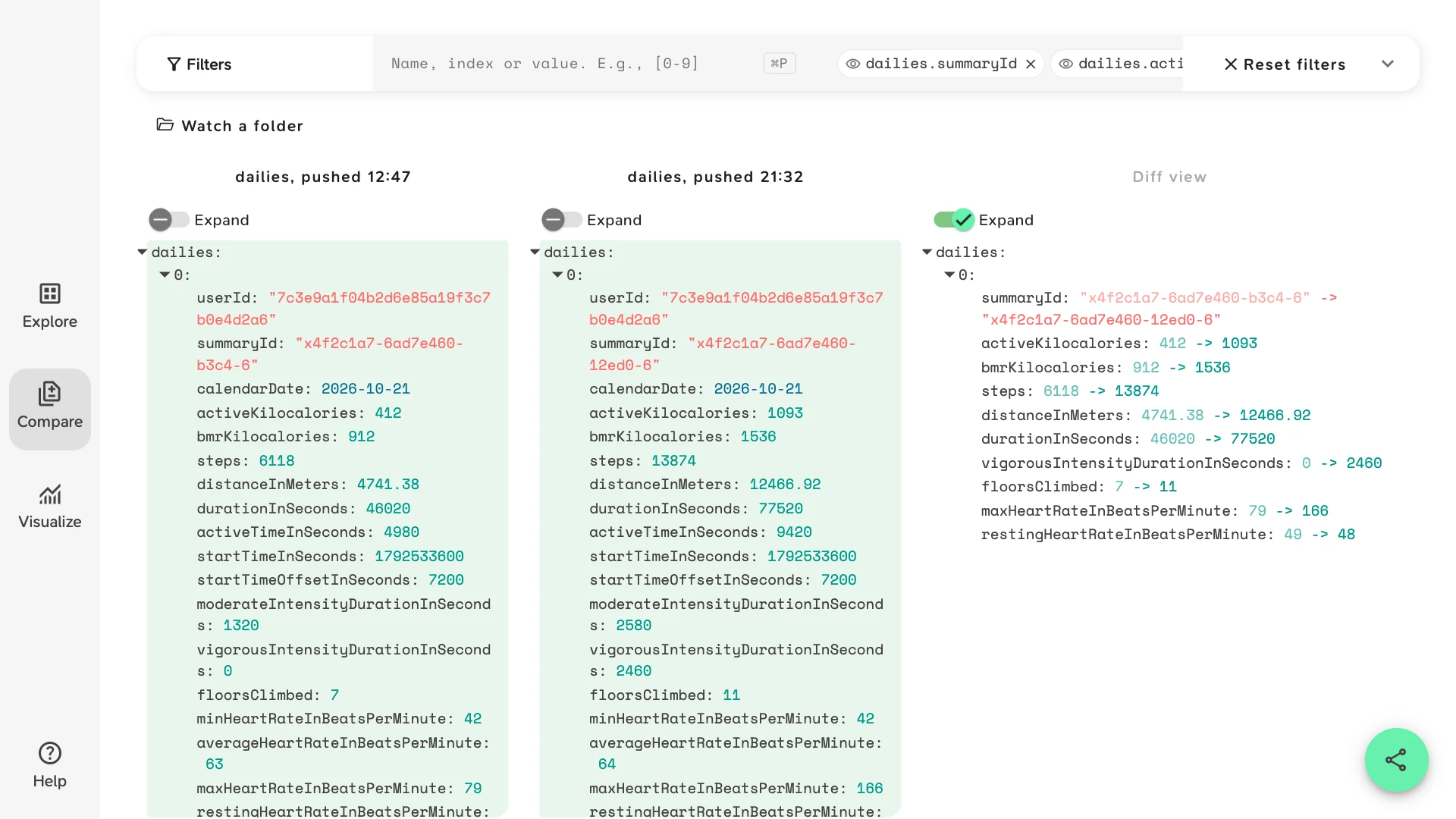
The sample is two push notifications of the dailies summary type for one user and one day, 21 October in UTC+2: the first after the user's watch synced at 12:47, the second after a sync at 21:32, with an evening run in between. It opens in Compare with a view of the day's totals. Turn on Expand in the Diff view:
durationInSecondswent from 46020 to 77520: each summary covers the day fromstartTimeInSeconds, local midnight, up to the sync. Once the day is complete, it is 86400.stepswent from 6118 to 13874,distanceInMetersfrom 4741.38 to 12466.92,activeKilocaloriesfrom 412 to 1093 andfloorsClimbedfrom 7 to 11. They are totals for the day so far, not what happened since the last notification.vigorousIntensityDurationInSecondswent from 0 to 2460 andmaxHeartRateInBeatsPerMinutefrom 79 to 166: the run.restingHeartRateInBeatsPerMinutewent from 49 to 48, worked out over more of the day.summaryIdchanged too. In the sample, as in the example daily summaries that research platforms publish, its middle parts are the start time and the duration in hex:6ad7e460is the start,b3c4and12ed0are 46020 and 77520 seconds.
The view leaves out timeOffsetHeartRateSamples, a heart rate for every 15 seconds keyed by its offset from the start of the day. The evening notification repeats the 3008 readings of the first and adds 2100 more. Click Reset filters to see them.
Both notifications are synthetic. Garmin shares the full Health API specification only with developers in its program, so the sample uses only field names that are publicly documented, by research platforms and aggregators that receive Garmin's daily summaries. Check them against the specification you get with access. The sample opens without an account. Its view:
{
  "v": 1,
  "view": "compare",
  "props": [
    "dailies.summaryId",
    "dailies.durationInSeconds",
    "dailies.steps",
    "dailies.distanceInMeters",
    "dailies.activeKilocalories",
    "dailies.bmrKilocalories",
    "dailies.vigorousIntensityDurationInSeconds",
    "dailies.maxHeartRateInBeatsPerMinute",
    "dailies.restingHeartRateInBeatsPerMinute",
    "dailies.floorsClimbed"
  ]
}
Replace the Day, Don't Add to It
A user's watch syncs with Garmin Connect several times a day, and each sync can bring a new daily summary for the same day. Store the latest one in place of the earlier ones, keyed by the user and startTimeInSeconds or calendarDate. If you key on summaryId and it changes, as in the sample, you keep both, and anything that adds up a day's records counts the morning twice.
When a total in your database doesn't match what the user sees in Garmin Connect, open the notifications you stored for that day in Compare, oldest next to newest, and the Diff view shows which one your code kept.
Push or Ping/Pull
Garmin's Health API delivers JSON summaries, such as dailies, epochs, sleep, stress, body composition, pulse ox and respiration, once the user's device has synced with Garmin Connect. You register an endpoint per data type, and Garmin calls it in one of two ways:
| Mode | What your endpoint receives |
|---|---|
| Push | The summaries themselves, in a list under the data type, e.g. dailies, each with the user's userId. The sample is two of these. |
| Ping/pull | A userId and a callbackURL per user, under the data type. You fetch the URL to get the summaries. |
Either way, save each body as it comes, with its time in the file name, so you can compare any two later.
Access Since the Program Reopened
Garmin paused new access to its Connect Developer Program in 2026 and reopened it on 21 October 2026 with three tiers. What each one means for the data you can compare:
| Tier | What it includes |
|---|---|
| Starter | For organisations. The Activity, Courses, Health, Training and Women's Health APIs, push delivery only, no historical data, and a limited number of users. |
| Enterprise | For companies at scale, on terms agreed with Garmin. Push or ping/pull, a month or more of historical data when a user connects, unlimited users and technical support. |
| Personal | For individuals and their own Garmin Connect data, with a personal API key. Pull only, and a separate API, with its own base URL, authentication and responses. |
Each company registers its own app and keeps its own credentials. Starter includes no historical data, so a user's history in your database starts with the first sync after they connect: keep every notification from then on, and you can compare any two of them.
Activities Come as FIT Files Too
Garmin's Activity API, a separate API in the same program, offers JSON summaries of activities and the activity files themselves. Slicelytics opens FIT files in the browser, decoded into named and scaled fields: see View FIT Files, and Compare Garmin FIT Files for two files of the same run from different watches.
Other Ways to Get Garmin Data
Aggregators such as Terra receive Garmin's summaries and send you their own normalised payloads, with their own update rules; see Compare Terra Webhooks, whose sample is a Garmin user's night. For other providers, see Compare Oura API Responses, Compare WHOOP API Responses, and the wearable API guide for what works across them.
Common Questions
Why did summaryId change between two notifications of the same day?
In the sample, as in example daily summaries that research platforms publish, its middle parts are the start time and the duration in hex, and the duration grows with each sync. Don't rely on it to find the record to replace; use the user and startTimeInSeconds or calendarDate.
Why is timeOffsetHeartRateSamples left out of the view?
It holds a reading every 15 seconds, thousands a day, keyed by seconds from startTimeInSeconds. Each new notification repeats the earlier readings and adds the new ones, so the Diff view lists every added key. Leave it out to see the totals, or open it on its own.
Can I compare other summary types?
Yes. Epochs, sleeps, stress details, body composition and the rest are JSON too. Compare matches list items by position, so compare notifications of the same type and user.
Do I need Garmin access to try this?
No. The sample opens without an account and without Garmin access. To compare your own users' data you need an app in Garmin's Connect Developer Program: Starter access for organisations, push only, or Enterprise. Garmin's Personal API, for your own data, returns a different shape.
Does the data leave my computer?
No. Slicelytics reads the files in your browser and uploads nothing. If you share a comparison, the data travels in the part of the link after #, which browsers never send to a server, so treat the link like the data. Check Garmin's program terms before you share a user's data with anyone.