
Compare Oura API Responses
You build on Oura's API v2. A webhook says a sleep was updated, you fetch the document again, and half its numbers are different from the ones you stored. Slicelytics puts the two versions side by side and lists every field that changed, so you can see what the update did before you decide what your code should do with it. The documents stay on your computer.
See What an Update Changed
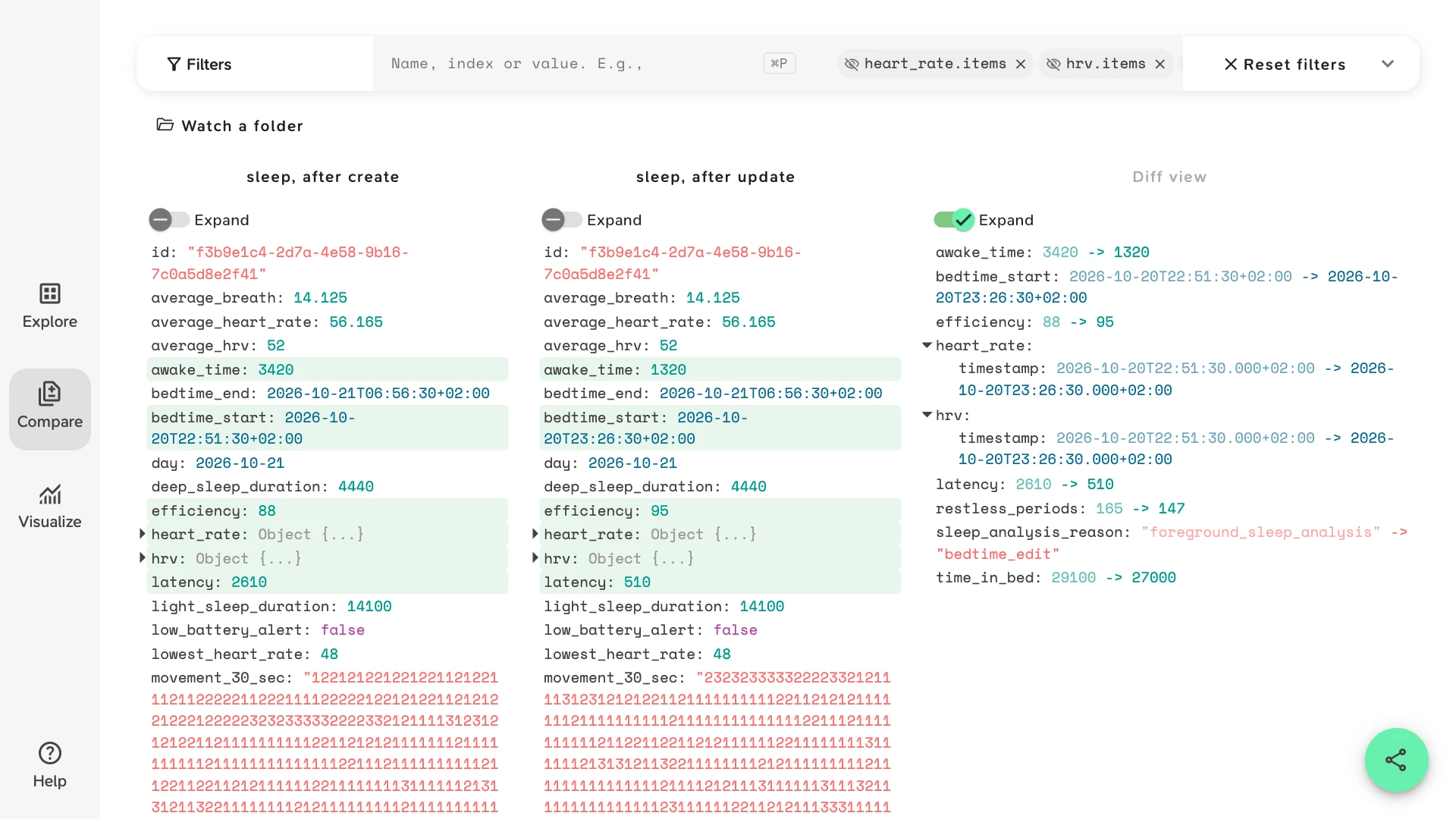
The sample is one night's sleep document from GET /v2/usercollection/sleep/{document_id}, fetched twice: after the create webhook, and after the update webhook that followed it. In between, the member opened the Oura app and moved their bedtime 35 minutes later, because they had been reading in bed. The sample opens in Compare with a view of the fields the edit touched. In the Diff view:
sleep_analysis_reasonwent fromforeground_sleep_analysistobedtime_edit. Oura's reference describes the field as the reason the latest version of the sleep was created or updated, so it tells you what kind of change to expect.bedtime_startmoved from 22:51:30 to 23:26:30, whilebedtime_endstayed at 06:56:30.time_in_bedfell from 29100 to 27000 seconds, andawake_timefrom 3420 to 1320.latency, the time it took to fall asleep, fell from 2610 to 510 seconds, andefficiencyrose from 88 to 95.total_sleep_durationis 25680 in both: the edit removed time awake, not sleep.heart_rate.timestampandhrv.timestampmoved with the bedtime, andrestless_periodswent from 165 to 147.
Click Reset filters to see the whole document. The sample arrays now start 35 minutes later, so heart_rate.items, hrv.items and sleep_phase_5_min lose their first seven 5-minute values and movement_30_sec its first 70 characters. Compare matches array items by position, so every item after the cut shows as changed, even where the reading is the same.
Both documents are synthetic, written to the sleep model in Oura's API v2 reference. The sample opens without an account. To open your own documents with the same view, type its paths into Filters, or give it to an agent:
{
  "v": 1,
  "view": "compare",
  "props": [
    "bedtime_start",
    "bedtime_end",
    "time_in_bed",
    "awake_time",
    "latency",
    "efficiency",
    "total_sleep_duration",
    "restless_periods",
    "sleep_analysis_reason",
    "heart_rate.timestamp",
    "hrv.timestamp"
  ]
}
Save Each Version When the Webhook Arrives
Oura's webhooks don't carry the data. You subscribe once for each pair of data_type and event_type, e.g. sleep and update, and each notification names what changed: its event_type, data_type, object_id, event_time and user_id. You then fetch the document by its object_id:
curl -s -H "Authorization: Bearer $TOKEN" \
  "https://api.ouraring.com/v2/usercollection/sleep/$OBJECT_ID" \
  > "sleep-$OBJECT_ID-$(date +%H%M%S).json"
Keep every version under its own name instead of overwriting the last one, and you can open any two of them later. Oura says notifications arrive about 30 seconds after data syncs from the app, and that sleep and readiness sync only when the member opens the app, so a night can come in as a create in the morning and an update whenever they next open it.
Subscriptions expire: each has an expiration_time, and PUT /v2/webhook/subscription/renew/{id} renews it. Oura retries a failed delivery for about an hour, then gives up, so a nightly fetch of the last few days catches what a missed notification would have told you. Comparing that fetch with what you stored shows whether anything slipped through.
What Else Changes in a Sleep Document
Look at these fields when two versions of the same sleep differ:
- Did
typechange?Oura's reference lists
long_sleep,sleep,late_nap,restanddeleted. A nap the member rejects in the app's confirm prompt isrest, and a sleep they delete isdeleted, so a record you counted can stop counting without disappearing. - What does
sleep_analysis_reasonsay?The reference lists
foreground_sleep_analysis,background_sleep_analysis,background_created_foreground_updatedandbedtime_edit. Comparing two versions shows you which fields each kind of update touches in your data. - Which
sleep_algorithm_versionscored it?v1is Oura's original sleep staging andv2the latest. When stage durations differ between two members, or between an old and a new document, check this first. - Did the day's scores move?
Scores live in their own documents:
daily_sleepanddaily_readiness, each with ascoreandcontributorssuch asefficiency,latencyandtiming. After a sleep changes, fetch the day's documents again and compare them the same way.
Compare a Range of Documents
The collection endpoints, such as /v2/usercollection/sleep with start_date and end_date, return a data list and a next_token. Compare matches list items by position, so fetch the same range both times; a sleep added or deleted in between shifts every document after it. The wearable API guide covers ranges, pagination and filtering a response by value.
If you receive Oura data through an aggregator rather than from Oura, see Compare Terra Webhooks: the payloads are Terra's normalised ones, and they come with their own update rules.
Before You Connect Users
API v2 is Oura's only API; v1 has been sunset. Access is through OAuth2, since personal access tokens were deprecated in December 2025. A new API application is limited to 10 users until Oura approves it, and each member consents to each data type separately. A 403 can mean a missing permission or that the member's Oura subscription has expired.
For the same kind of check on other APIs, see Compare WHOOP API Responses and Compare Garmin Health API Data.
Common Questions
Why does every heart rate sample show as changed?
Compare matches array items by position. When bedtime_start moves, heart_rate.items and hrv.items start at a different time, so item 9 of one version is not the same 5 minutes as item 9 of the other. Compare the scalar fields and the timestamp of each sample object, as the sample view does.
Does the webhook carry the new values?
No. An Oura notification has the event_type, data_type, object_id, event_time and user_id, and you fetch the document by its object_id. To compare versions, save each fetched document; the notification alone doesn't tell you what changed.
Can I compare daily_sleep or daily_readiness documents?
Yes. Any JSON response opens: a single document, or a collection response with its data list. Two versions of the same day line up field by field, contributors included.
Which other formats open?
JSON, NDJSON/JSONL, CSV, TSV, TOON and FIT files, plain or compressed as .gz or .zst. If you log every document you fetch as a line of an NDJSON file, see View JSONL Logs.
Does the data leave my computer?
No. Slicelytics reads the files in your browser and uploads nothing. If you share a comparison, the data travels in the part of the link after #, which browsers never send to a server, so treat the link like the data. Check Oura's API terms before you share a member's data with anyone.