
Compare pytest-benchmark Runs
pytest-benchmark can save each run as a JSON file in .benchmarks. Open two of them in Slicelytics to see every statistic that changed, side by side, or watch the folder so that each new run is a click away. The runs stay on your computer.
See What Changed
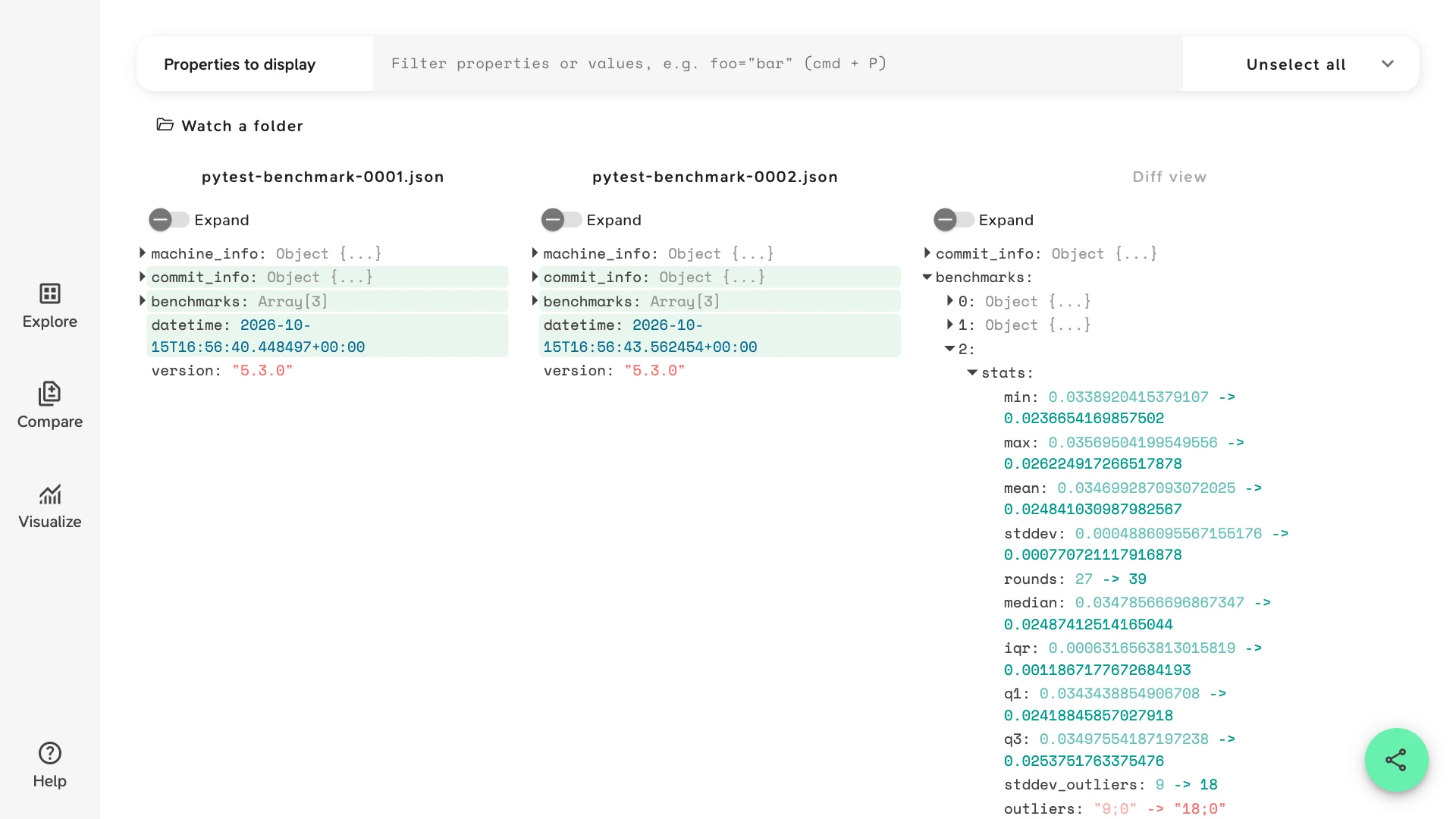
Open two saved runs in Compare. Slicelytics shows them side by side, highlights what differs, and the Diff view lists only the changes, statistic by statistic.
The sample benchmarks an access-log parser on 100, 10,000 and 100,000 lines, saved with --benchmark-autosave before and after one commit that swapped its regular expression for str.split. In the Diff view:
commit_info:idandtimeshow which commit each run measured.benchmarks, then2, thenstats: the 100,000-line test'smeanfell from 0.0347 to 0.0248 seconds, about 29% faster, and itsops, calls per second, rose from 28.8 to 40.3. The other two tests sped up by about as much.
The sample opens without an account. Both files are real pytest-benchmark 5.3 runs, with only the computer's name in machine_info.node replaced: pytest-benchmark-0001.json and pytest-benchmark-0002.json.
Save Each Run
Have pytest-benchmark save every run, e.g. once per commit:
pytest --benchmark-autosaveEach run lands in a folder per operating system and Python version, numbered, and named after the commit and the time:
.benchmarks/Darwin-CPython-3.13-64bit/0001_b83481736d3c33883c22219247d1c09c808fb300_20261015_165637.json Use --benchmark-save=NAME to pick the name yourself. Saved runs hold each test's statistics only. --benchmark-json=PATH also writes every single timing, which for a fast test can be tens of thousands of numbers.
Run the Same Tests Both Times
Compare matches the entries of benchmarks by their position, in the order pytest ran the tests. Run the same selection for both runs: a -k filter, or a test added in between, shifts every benchmark after it, and they all show as changed.
Every statistic differs a little from run to run, so the diff lists each test's min, max, stddev and rounds too. To keep only the statistics you go by, open the comparison with a view that names them. Compare the sample's means, medians and calls per second, with this view:
{"v":1,"view":"compare","props":["benchmarks.stats.mean","benchmarks.stats.median","benchmarks.stats.ops"]}Watch the .benchmarks Folder
In Chrome or Edge, click "Watch a folder" in the Explore view, and pick your machine's folder in .benchmarks. On macOS, press Cmd+Shift+. in the folder picker to show hidden folders. Slicelytics lists the saved runs, newest first, and each new run joins the list a couple of seconds after pytest writes it. Click any run to open it.
To diff two runs, open them both in Compare, or let your agent do it: see below. The folder is remembered across visits.
Let Your Agent Open Both Runs
If an AI coding agent such as Claude Code runs your benchmarks, ask it to "compare the last two pytest-benchmark runs in Slicelytics". With the Slicelytics skill, the agent builds a link that carries both runs and opens Compare with them. If you watch the .benchmarks folder, it can write a view file next to the newer run instead, naming the run to compare it with:
// 0002_92c92bc4e936c3feff8356d7d1929bccf3db9362_20261015_165640.view.json
{ "v": 1, "compare": "0001_b83481736d3c33883c22219247d1c09c808fb300_20261015_165637.json" }
The benchmark runs guide covers view files in more detail.
Common Questions
Does the data leave my computer?
No. Slicelytics reads the runs in your browser and uploads nothing. If you share a comparison, the data travels in the part of the link after #, which browsers never send to a server, so treat the link like the data: anyone who has it can open it. Saved runs include your computer's name, in machine_info.node, and a shared link carries it too.
How is this different from pytest-benchmark compare?
pytest-benchmark compare prints the saved runs' statistics as a table in your terminal. Slicelytics shows the whole files side by side, including machine_info and commit_info, lists only what changed, and lets you share a comparison as a link.
Can I compare runs from two machines?
Yes. pytest-benchmark saves them in different folders, but Compare opens any two files, and machine_info shows how the machines differ. Times from different hardware aren't comparable, though.
Can I chart a statistic across many runs?
Visualize charts one file at a time. Write one row per run, e.g. run and mean, to a CSV or NDJSON file, and open it in Visualize with run as the x-axis.