
Compare Garmin FIT Files
You take activity files from Garmin's Activity API or from your users' uploads, and two files of the same kind of activity don't parse alike: one has twice the records, a field your code reads is missing, a sensor appears in one and not the other. Slicelytics decodes both FIT files in your browser and lists what differs: device, firmware, paired sensors, message types and fields. The files stay on your computer.
See What Made Each File
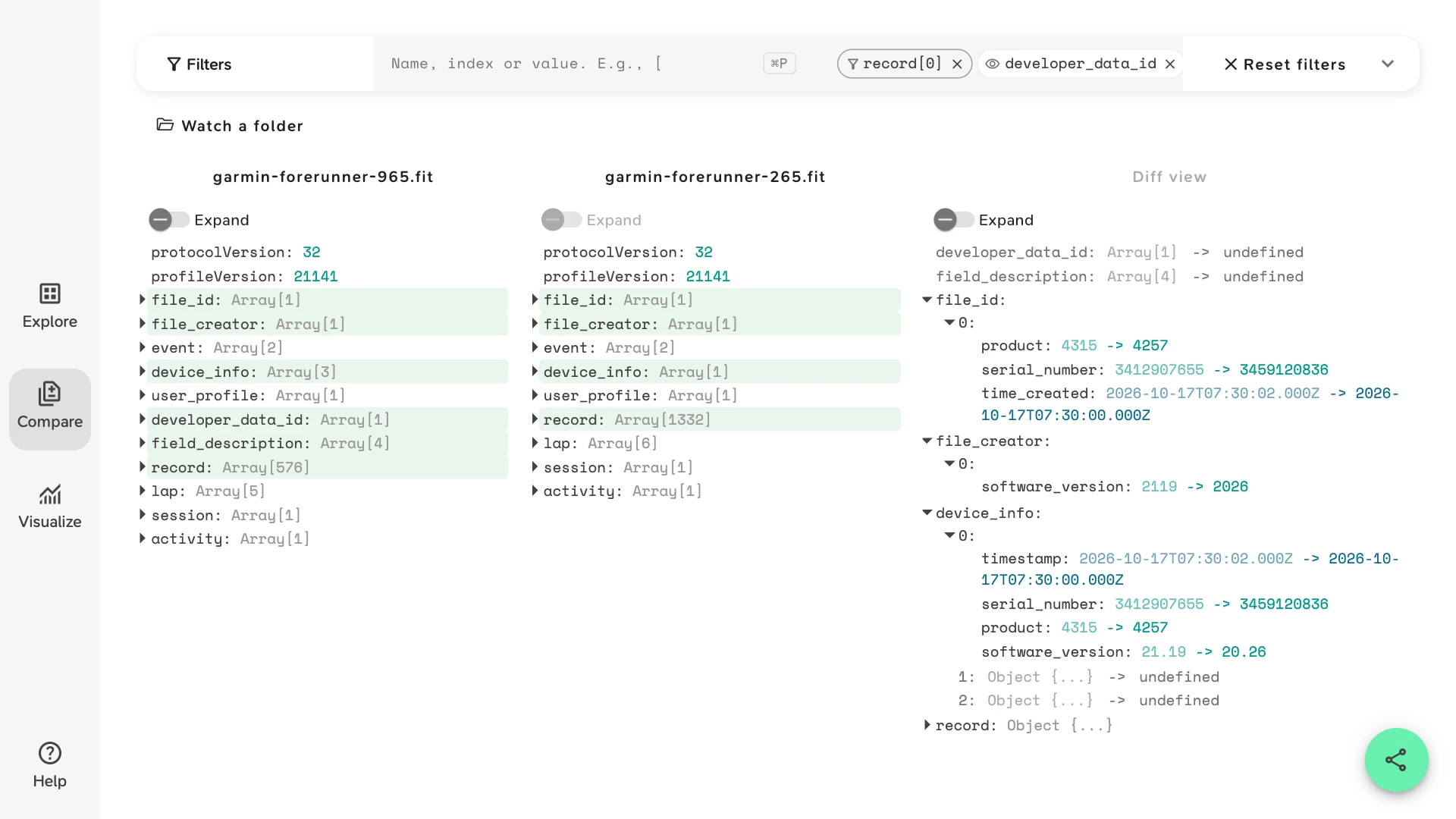
The sample is one 5 km run, recorded at once by two Garmin watches: a Forerunner 965, paired with an HRM-Pro Plus chest strap and a Stryd foot pod and set to smart recording, and a Forerunner 265 on the other wrist, with no sensors, measuring heart rate at the wrist and recording every second. It opens in Compare with a view that keeps the messages describing each file, and its first record, rather than the run. In the Diff view:
file_idsays which watch made the file:productwent from 4315 to 4257. Products are numbered per manufacturer; in Garmin's list, 4315 is the Forerunner 965 and 4257 the Forerunner 265.serial_numbertells two watches of the same model apart.file_creator.software_versionwent from 2119 to 2026, and the watch'sdevice_info.software_versionfrom 21.19 to 20.26: the same firmware versions, stored in hundredths in one message and scaled in the other.device_infolists the watch and every sensor paired with it. The 965's file has three entries: the watch, the chest strap at 3.8 and the Stryd pod at 1.67, each with its serial number andbattery_status. The 265's file has only the watch.developer_data_idandfield_descriptionare only in the 965's file. They declare the Stryd pod's developer fields; see FIT Developer Fields for how to read them.record.0, the first sample, shows which fields each file records. The 965's has the Stryd'sPower,Form Power,Air PowerandLeg Spring Stiffness; the 265's haspower, Garmin's own running power from the wrist, 0 until the runner moves. The same measure arrives in a developer field from one watch and a standard field from the other. The 265'stimestampis 2 seconds earlier: the watches weren't started in the same second.
The two panes on the left count each message type. The 965's file has 576 record messages and the 265's 1332 for the same 22 minutes: smart recording stores a point when something changes, every-second recording one a second. Both files are synthetic, written to the FIT profile. The sample opens without an account.
What Changes Between Two Garmin Recordings
Two files from Garmin devices differ in the same places, for reasons your code may need to handle. Open both in Compare and look here:
| What changed | Where it shows |
|---|---|
| A different model | file_id.product and the creator's entry in device_info. A Forerunner, a Fenix and an Edge write different sets of fields and messages. |
| A firmware update | file_creator.software_version and the watch's device_info.software_version. New firmware can add fields or messages. |
| Smart or every-second recording | The number of record messages, and the gaps between their timestamps. Many Garmin devices let the wearer choose. |
| A sensor paired or missing | Entries in device_info, and record fields such as heart_rate from a chest strap or power from a power meter. |
| A Connect IQ data field | developer_data_id, field_description, and record fields named by the app. |
| GPS off, e.g. on a treadmill | Records without position_lat and position_long, and a distance from the watch's accelerometer or a foot pod. |
Compare the Messages, Chart the Records
Compare matches list items by their position. Two recordings rarely start in the same second or store points at the same rate, so their record lists don't line up, and the Diff view shows nearly all of them as changed. The messages that describe the file, and the session and lap summaries, do line up field by field.
For the run itself, what each device measured for distance, heart rate and laps, see View FIT Files: it compares two watches' session and lap summaries and charts their records in Visualize.
Check a New Device Before You Support It
When users start sending files from a device you haven't handled before, open one of its files in Compare next to one your parser already reads well. The Diff view shows what your code will meet: a message type missing, a field only one device writes, a developer field where you expected a standard one, a different recording rate. To open your own files with the sample's view, type its paths into Filters, or give it to an agent:
{
  "v": 1,
  "view": "compare",
  "props": [
    "file_id",
    "file_creator",
    "device_info",
    "developer_data_id",
    "field_description",
    "record[0]"
  ]
}
To see the whole file, drop the view and open each message type in turn. Fields are named and scaled as the FIT profile defines them, so you read values, not raw integers, and can check them against your parser's output.
Common Questions
Why does the Diff view show nearly every record as changed?
Compare matches list items by their position, not by their time. Two recordings rarely start in the same second or store points at the same rate, so record 100 of one file isn't the same moment as record 100 of the other. Compare the file's messages and its session and lap summaries, and chart the records.
Why is product a number?
The FIT profile names products per manufacturer, and Slicelytics shows the number the file stores. In the profile's list of Garmin products, 4315 is fr965, the Forerunner 965, 4257 is fr265_large, the Forerunner 265, and 4130 is hrm_pro_plus, the chest strap.
Can I compare two activities from different days?
Yes. The file and device messages line up field by field, so you see a firmware update or a new sensor between the two. The records and laps differ anyway, because the activities do.
Which Garmin devices work?
Any that write FIT activity files: Forerunner, Fenix, Epix, Venu, Instinct and Enduro watches, and Edge bike computers. FIT files from other brands open too. See View FIT Files.
Do the files leave my computer?
No. Slicelytics decodes both files in your browser and uploads nothing. If you share the comparison, the data travels in the part of the link after #, which browsers never send to a server.