
View JSONL and NDJSON Logs in Your Browser
Open a JSONL or NDJSON log, gzipped or not, and see every line as an expandable item. Filter it down to the lines you care about, such as the errors from one endpoint, without writing a single jq query. The file is read in your browser and never uploaded.
Every Log Line as an Item
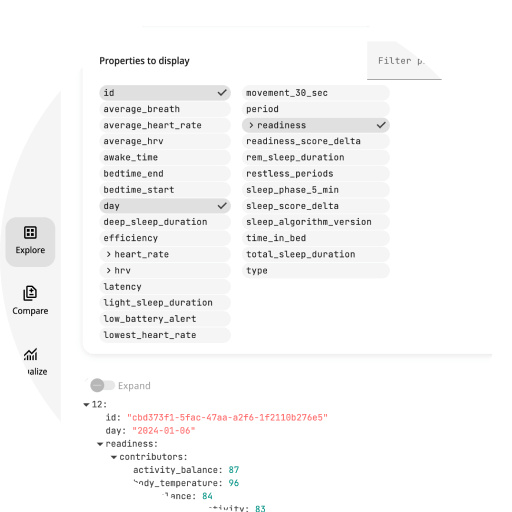
Drop a .jsonl or .ndjson file onto Slicelytics Explore. Each line becomes one item, with nested objects and arrays you can expand. Hide the properties you don't need, such as request IDs and hostnames, and the rest of the log gets easier to read.
Filter by Value
Type a value filter to keep only the lines you are after, e.g. level="error", status="500", or request.endpoint="/api/search" for a nested field. Property names autocomplete as you type, and each filter stays visible as a chip you can remove. Filters apply to the whole file, not only to the lines on screen.
Large and Compressed Logs
- Gigabytes without freezing: NDJSON files are read in the background, with a progress bar. The first lines show right away, and the page stays responsive.
- Compressed logs:
.gzand.zstfiles are decompressed in your browser. - Truncated files: if a log is cut short, e.g. by a crashed process, the lines read until then are kept, and the reason is shown.
- 100 lines at a time: "Load more" shows the next batch.
Count Lines by Value
To see how many requests hit each endpoint, or how many lines each log level has, open the log in Visualize, pick the property, and choose the density metric. It draws one bar per distinct value.
Let Your Agent Open the Log
If an AI coding agent such as Claude Code is debugging with you, ask it to "show only the failed requests in responses.ndjson in Slicelytics". With the Slicelytics skill, the agent leaves the file as it is and puts the filter in the view it opens:
{ "v": 1, "view": "explore", "filters": { "status": "500" } }Small logs travel in a link. For larger ones, or a process that writes a new log on every run, the agent writes the files into a folder that Slicelytics watches. See the AI agents guide.
Common Questions
What is the difference between JSONL and NDJSON?
None that matters here: both are one JSON value per line. Slicelytics opens .jsonl and .ndjson files the same way.
Is my log uploaded anywhere?
No. Slicelytics reads the file in your browser. When you share a filtered view, the data travels in the part of the link after #, which browsers never send to a server.
Can I compare two logs?
Yes, in Compare, which matches lines by their position in the file.